
Note Latch is a MIDI effect — not an instrument — so it drops in front of any synth or sound source you already own. One control captures what you're holding, swaps it for something new, or lets it go.
$19$29LAUNCH PRICE
MIDI EFFECT · WORKS WITH ANY INSTRUMENT OR SYNTH · AU & VST3 · macOS
WHY A MIDI EFFECT
Note-latching has started showing up baked into individual synths and instrument plugins — which means it only works with that one sound, and the workflow resets every time you switch instruments.
Note Latch does the same job as a MIDI effect instead. Learn the workflow once, and it works in front of any instrument or synth already in your rig — today, and with whatever you add later.
THE PROBLEM
When a pad or drone needs to keep sounding, sustain-pedal tricks, long MIDI clips, and manual automation get in the way of just playing. Note Latch captures exactly the notes you're physically holding the moment you engage the latch. Notes held only by the sustain pedal are left alone.
Hold a pad chord behind a piano part. Build a constant drone under a lead sound. Replace a latched chord without stopping playback. Once it's latched, it keeps sustaining until you decide otherwise — hands free for whatever comes next.
01 · HOLD THE NOTES
Press and hold the notes or chord you want to sustain, right on your keyboard.
02 · PRESS LATCH
The notes you were holding keep sounding. Latch can be assigned to any CC control, so it's one hands-free move mid-performance.
03 · KEEP PLAYING
Play on top of the latch, with everything outside it blocked or softened — your choice.
Hold a new chord and press Latch again to replace what's sustaining — or press Latch with nothing held to release it.
LATCH HELD NOTES ONLY
Only keys you're physically holding get latched — notes held just by the sustain pedal are left out.
REPLACE INSTANTLY
Hold a new chord and press Latch to swap what's sustaining, or press it with nothing held to release the latch entirely.
BLOCK OR SOFTEN EXTRA NOTES
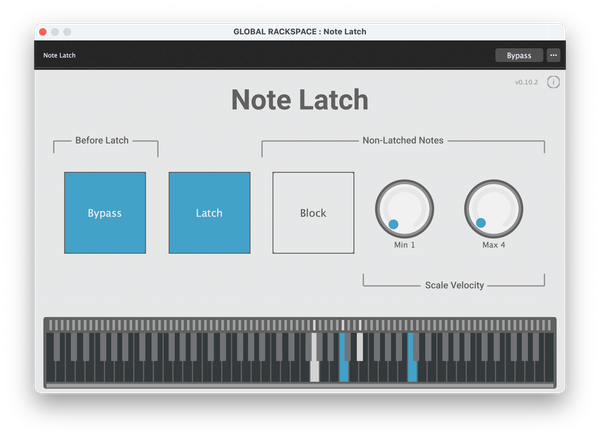
Choose whether notes outside the latch are blocked entirely, or passed through at a scaled-down velocity so a strong pad and quiet supporting notes coexist.
SEE WHAT'S LATCHED
Pressed, active, and latched notes each show up distinctly on the plugin's keyboard display, so you always know what's sustaining.
FOCUSED CONTROLS, NO CLUTTER
BEFORE LATCH
Decide whether notes play normally before anything's latched, or stay silent until you intentionally engage the latch — useful when a pad should only sound once you mean it to.
MIN / MAX VELOCITY
When non-latched notes are allowed through, dial in a velocity range so they sit softer than the latched pad instead of competing with it.
AU & VST3 · macOS 12+ · APPLE SILICON & INTEL · WINDOWS IN DEVELOPMENT
LAUNCH PRICE · macOS
Add Note Latch before your favorite pad instrument and turn held notes into a playable sustained layer.
$19$29LAUNCH PRICE
LAUNCH SALE · REGULARLY $29 · LICENSED THROUGH MOONBASE
Not sure yet? Try it free for 14 days.