
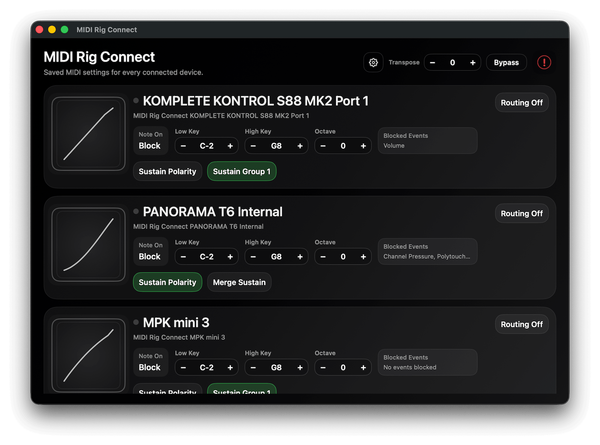
MIDI Rig Connect sits between your controllers and your instruments, reshaping velocity, key range, transpose, and sustain for every device you connect — then remembers it, automatically, every time you plug back in.
THE PROBLEM
Walk up to a venue's backline keyboard, a borrowed synth, or a new controller and something's always off — velocity that fights you, a sustain pedal wired backwards, black keys that hit harder than the whites. Normally that means digging through that instrument's own menus mid-soundcheck, if the option's even in there at all.
MIDI Rig Connect fixes it from one place on your Mac, in seconds. No hunting through menus mid-soundcheck.
01 · CONNECT
Every MIDI device shows up as its own card the moment it's connected. No refresh, no relaunch.
02 · ROUTE
MIDI Rig Connect creates a clean, named virtual port for that device — select it as the input in your instrument or DAW.
03 · SHAPE IT
Set velocity, range, sustain, and filtering for that device, then get back to playing.
VELOCITY CURVE EDITOR
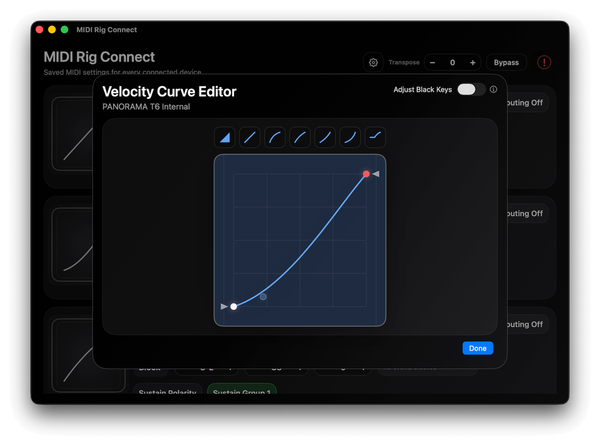
Drag the curve and its handles to make a keybed softer, harder, more limited, or more expanded — with min/max output handles, one-tap presets, a straight pass-through reset, and full curve inversion.
ADJUST BLACK KEYS
A dedicated correction curve, applied before the main one, that evens out black keys that hit harder or softer than the whites on a given controller. Starts flat, remembered per device, and can be toggled without losing your work.
EVENT FILTERING
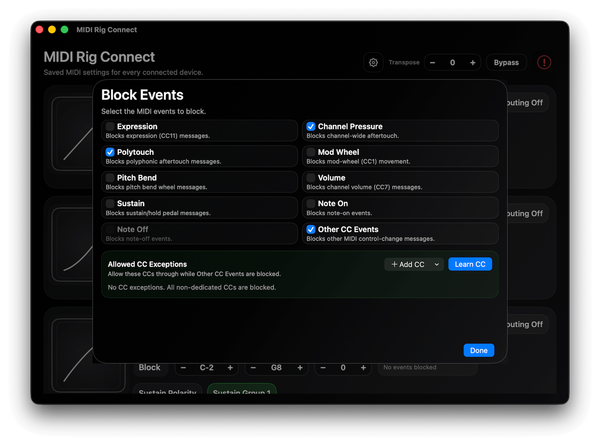
Block Expression, Channel Pressure, Polytouch, Mod Wheel, Pitch Bend, Volume, Sustain, Note On, Note Off, and other CC messages per device — so an accidental knob bump or noisy aftertouch never derails a patch.
Blocking "Other CC Events" doesn't have to be all-or-nothing: add specific CC numbers as exceptions manually, or capture them instantly with Learn CC.
VIRTUAL OUTPUTS
Each connected device — and each port on multi-port gear — gets its own named virtual MIDI source, ready to select in any host.
KEY RANGE & OCTAVE
Set a Low Key / High Key range per device, and shift octave independently to extend a smaller controller's range on the fly.
GLOBAL TRANSPOSE
Transpose every active route together by drag or +/−, with a bypass switch that never loses your saved value.
SUSTAIN POLARITY & SHARING
Fix a reversed pedal instantly, or merge sustain across a group of controllers — the highest current value wins, so half-pedaling still works.
MIDI LEARN
Map notes, CC on/off, or directional CC movement to functions like octave, transpose, sustain polarity, or note blocking — your controls, your call.
MIDI PANIC
Send note-off and sustain-off across every active route with a single assignable control — no more stuck notes.
IT REMEMBERS
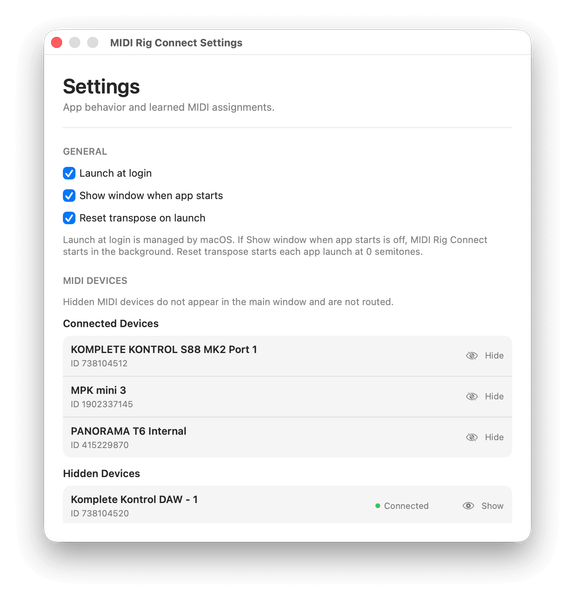
Every setting is tied to a device's stable MIDI identity, not just its name — so it comes back automatically on reconnect, at home or on a different stage entirely. Devices you don't want cluttering the main view can be hidden without losing their configuration, and brought back anytime.
MIDI Rig Connect runs quietly in the background: launch at login, start with or without the window open, and optionally reset transpose to zero at the start of every session.
PRIVACY
No account to create, no analytics, and no tracking. MIDI Rig Connect stores your device settings on your Mac and doesn't collect or send your personal information.
macOS 14 SONOMA OR LATER · APPLE SILICON & INTEL · WORKS WITH ANY APP THAT ACCEPTS MIDI INPUT
FREE · macOS